

You're getting visitors. Analytics proves it. But the phone isn't ringing and the inquiry form is quiet. Somewhere between someone landing on your site and someone actually buying from you, the trail goes cold, and most businesses never figure out exactly where.
Traffic tells you people found you. Conversion rate tells you whether your website actually deserved to be found.
If this feels familiar, the good news is that a low-converting website is almost never a mystery. It's usually four or five specific, fixable problems stacked on top of each other. This guide walks through exactly what those are, in plain language, no jargon.
Traffic Isn't the Problem, Trust Is
It's tempting to assume more visitors will fix a sales problem. In practice, sending more traffic to a website that doesn't convert just means more people leave disappointed, faster. The red flags that quietly kill conversions usually show up in the first few seconds, long before a visitor reads a single word of your copy.
A visitor decides, almost unconsciously, whether your business feels credible before they decide whether your offer is good. Get that first impression wrong and no amount of clever copywriting further down the page saves it.
The Real Reasons Visitors Leave Without Converting
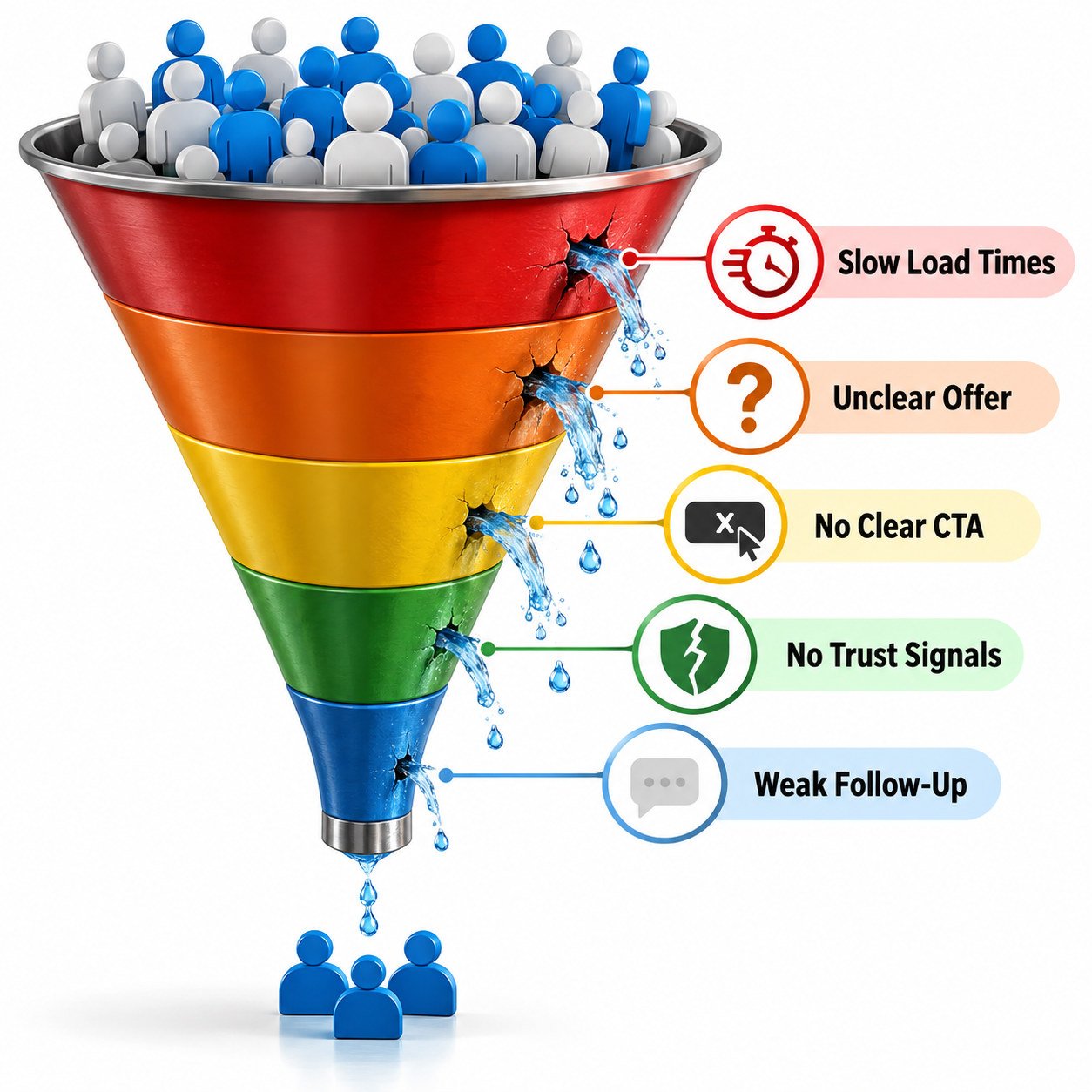
Slow Load Times
Every extra second before your page becomes usable pushes a meaningful share of visitors to hit back before they've seen anything.
Unclear Offer
If a visitor can't tell what you do and why it matters within a few seconds, they won't stick around to figure it out.
No Clear Next Step
A page with five competing buttons and no obvious priority leaves visitors doing nothing at all.
Missing Trust Signals
No reviews, no real photos, no way to verify you're a genuine business quietly raises doubt at exactly the wrong moment.
The First Five Seconds Decide More Than You Think
Before a visitor reads your headline properly, they've already formed a snap judgment based on layout, speed and visual polish. This is where a lot of businesses lose people without ever knowing it happened, since nothing "breaks", the visitor simply never engages.
What a Strong First Impression Actually Looks Like
A clear headline that states what you do and who it's for, a visual that supports rather than distracts, and a page that loads fast enough that the visitor never has time to get impatient. Google's own web.dev guidance is a genuinely useful benchmark here if you want to test your own site's speed honestly.
Your Call-to-Action Is Probably Doing Too Much or Too Little
Most underperforming websites have one of two CTA problems: too many competing buttons asking for different things, or one vague button that doesn't tell the visitor what happens next. Neither gives a visitor a confident reason to click.
- One primary action per page, stated in plain, specific language
- A button that describes the outcome, not just the action, "Get a free quote" beats "Submit"
- Enough visual weight that the CTA is impossible to miss on a first scroll
- A CTA repeated at a natural second point on longer pages, not buried once at the very top
A well-designed page built around good web development practice treats the CTA as the single most important element on the page, not an afterthought bolted on at the end.
Trust Signals: The Quiet Deal-Breaker
Buyers, especially in India, rarely purchase from a business they can't quickly verify. If your site doesn't show real people, real reviews and real contact details, visitors don't consciously distrust you, they just quietly hesitate and leave to check elsewhere.
If you want a deeper walkthrough of exactly which trust signals matter most, our guide on building credibility covers this in detail.
Mobile Experience Is Not Optional Anymore
For most Indian businesses, the majority of traffic now arrives on a phone. A site that was only ever tested on a laptop screen frequently has broken layouts, oversized images and buttons too small to tap comfortably, and none of that shows up unless you actually check.
A Quick Mobile Check You Can Run Today
Open your own site on your phone, on mobile data, not office WiFi. Try to complete the exact action you want a customer to take. If it's frustrating for you, someone who already trusts the business, it's far worse for a stranger.
Common Conversion Mistakes We See Constantly
- A homepage that talks about the company instead of the visitor's actual problem
- Contact forms asking for far more information than the inquiry actually needs
- Stock photography that feels generic instead of showing real work or real people
- No follow-up system, so a genuine lead goes cold within a day of inquiring
- Pricing hidden so deeply that curious visitors give up before they ever ask
Conversion Myths That Waste Time and Budget
A few persistent assumptions send businesses chasing the wrong fix entirely.
"We Just Need More Traffic"
More visitors to a leaking funnel just means more people leave frustrated, faster. Fix the leak before spending more to fill it.
"A Prettier Design Will Fix It"
Visual polish helps trust, but it can't compensate for a confusing offer, a broken form, or a page that takes eight seconds to load.
"Conversion Rate Doesn't Apply to Us"
Every website, whether it sells a product, books appointments, or simply collects inquiries, has a conversion rate. Not tracking it doesn't mean it isn't happening, it just means nobody's watching it.
A Practical Conversion Audit You Can Run This Week
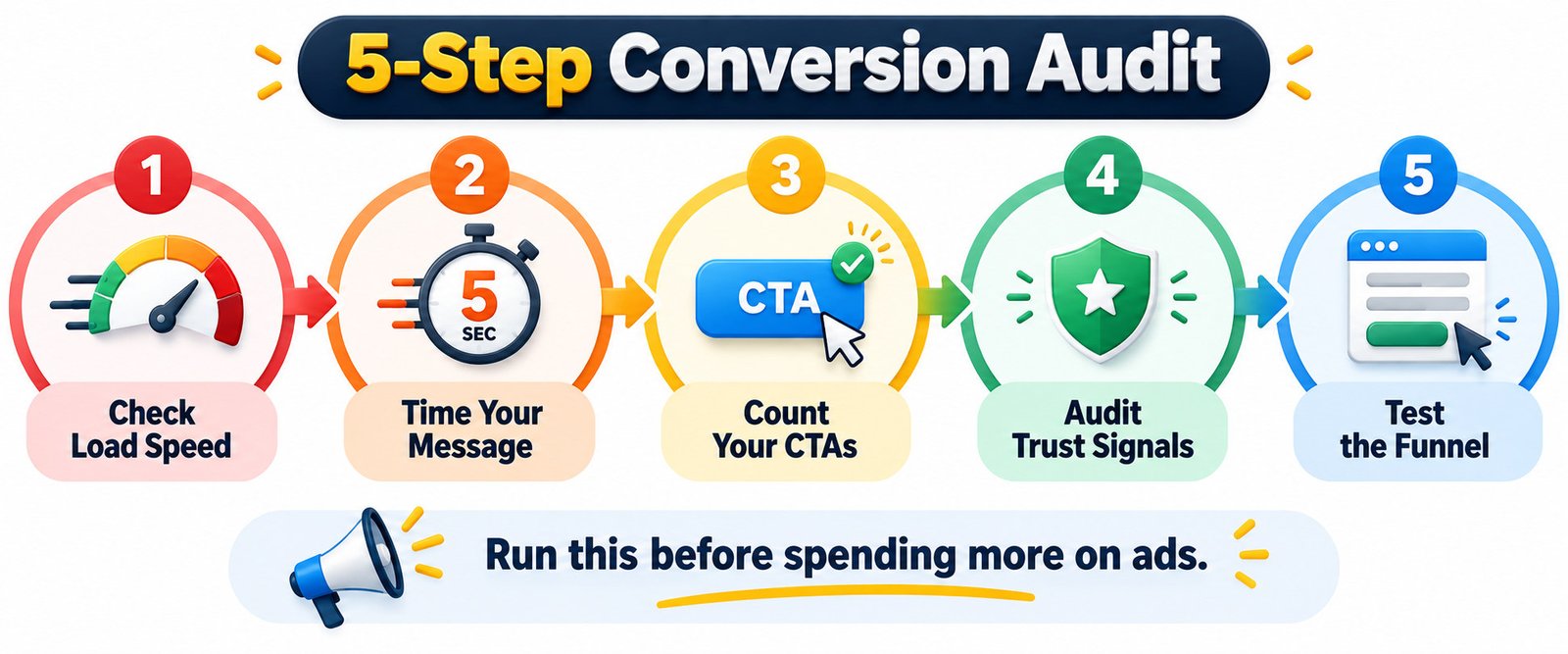
Step 1: Check Your Load Speed
Test your homepage and your most important landing page. Anything that feels sluggish on a phone is costing you visitors right now.
Step 2: Time Your Own Message
Give a page five seconds. Can a stranger tell what you do and who it's for? If not, the headline needs work before anything else.
Step 3: Count Your CTAs
List every button and link competing for attention on your key pages. Cut it down to one clear priority action.
Step 4: Audit Your Trust Signals
Check whether real reviews, real photos and clear contact details are genuinely visible, not buried in a footer nobody scrolls to.
Step 5: Test the Actual Funnel
Fill out your own form or start your own checkout. Every extra field or confusing step is a visitor you're quietly losing.
Track the impact of each fix in Google Analytics rather than guessing, so you know which change actually moved the number.
Design Choices That Quietly Build or Break Trust
Visual polish isn't vanity, it's a genuine trust signal. A cluttered layout, mismatched fonts or inconsistent colours read as carelessness, and carelessness on the surface makes visitors assume carelessness in the actual service too.
Accessibility matters here as well. A site that's hard to read for visitors with low vision or that doesn't work with a screen reader is quietly losing customers and falling short of the standards described in the WAI guidelines. Good, consistent design fixes both problems at once.
Why Traffic Source Changes Everything
Not all traffic converts the same way. Someone arriving from a specific Google search already has intent and a question in mind. Someone arriving from a broad social post is often just browsing. Sending both types to the exact same generic homepage wastes the higher-intent visitor's readiness to act.
Matching your landing page to what the visitor was actually looking for, rather than funnelling everyone to one page, is one of the fastest ways to lift conversion without touching your traffic volume at all. This is also where consistent social media messaging and your website need to genuinely agree with each other.
A Realistic Before-and-After Example
Picture a small home services business getting a steady 2,000 visitors a month, but only three or four inquiries. The homepage opens with a paragraph about the company's history, the contact form asks for eleven fields, and there's no phone number visible without scrolling past three sections first.
After a focused fix: the headline changes to state the exact service and city, the contact form drops to three fields, a click-to-call button sits at the top of every page, and two real customer reviews appear right under the headline. Traffic doesn't change at all that month. Inquiries triple.
Nothing in that fix required new visitors. It required removing friction that was already quietly costing the business every single day.
How to Prioritize Fixes When You Can't Do Everything at Once
Most businesses can't rebuild their entire site in a week, and trying to fix everything simultaneously usually means nothing gets finished properly. A simple order of operations works better than tackling it all at once.
- Fix anything actively broken first, dead links, non-working forms, pages that don't load on mobile
- Then fix clarity, the headline and the single primary call-to-action
- Then add trust signals, reviews, real photos, visible contact details
- Then optimize speed and technical polish once the fundamentals are solid
Fixing speed on a page with a confusing offer, or polishing design on a page with a broken form, wastes effort on the wrong layer of the problem first.
How to Know If a Fix Actually Worked
Guessing whether a change helped is a common trap. A genuine before-and-after comparison needs a consistent window, at least two to three weeks of comparable traffic, and one change tested at a time wherever possible, so you know exactly what caused the shift.
What to Actually Track
Inquiry or purchase count matters more than raw visitor count. A page that converts fewer visitors into far more genuine leads is doing its job better than a page with impressive traffic and an empty inbox.
See Our Recent Drops
Talking about conversion-focused websites is one thing, seeing them is another. Take a look at our recent work to see exactly how these fixes, faster load speed, a single clear CTA, genuine trust signals, come together on real client websites we've built.
How MGA Brand Buzz Can Help
| What You Need | How We Help | Link |
|---|---|---|
| A faster, conversion-focused website | Rebuilds and audits focused on speed, clarity and a single strong call-to-action | Web Development |
| Landing pages that match search intent | SEO-aware pages built around what visitors are actually searching for | SEO |
| Visuals that build instant trust | Consistent, professional design across your site and every touchpoint | Graphic Design |
| A conversion plan that doesn't fit a template | Custom audits and fixes for niche funnels or unusual sales processes | Custom Solutions |
The Bottom Line
Speed, clarity, a single clear next step, genuine trust signals and a funnel that actually matches how someone arrived. Fix those in order and the same traffic you already have starts working far harder for you.
Frequently Asked Questions
Why is my website getting traffic but no sales?
Usually a mix of slow load speed, an unclear offer, too many competing calls-to-action, or missing trust signals like reviews and real contact details. Traffic and conversion are separate problems.
What is a good website conversion rate?
It varies heavily by industry, but most informational or service websites see meaningful improvement simply by fixing speed, clarity and trust signals, regardless of the specific benchmark number.
How long should my contact form be?
As short as possible. Ask only for what you genuinely need to respond to the first inquiry, name, contact method and a brief message. Extra fields quietly reduce completions.
Does website speed really affect conversions?
Yes, significantly. Visitors abandon slow-loading pages within seconds, often before they've seen your offer at all, especially on mobile connections.
Should I have more than one call-to-action on a page?
Generally no. One clear primary action performs better than several competing ones. If you need a secondary action, make it visually much less prominent than the main one.
How do trust signals actually affect conversions?
Real reviews, visible contact details and genuine photos reduce the hesitation a new visitor feels before committing, which directly increases the odds they complete an inquiry or purchase.
Can I fix a low-converting website without a full redesign?
Often, yes. Targeted fixes to speed, calls-to-action, trust signals and form length frequently improve conversion significantly before a full redesign is ever necessary.
Want a clear, honest look at exactly where your website is losing visitors? Contact us and we'll walk you through what to fix first.